This site uses cookies.
Some of these cookies are essential to the operation of the site,
while others help to improve your experience by providing insights into how the site is being used.
For more information, please see the ProZ.com privacy policy.
VIA AILooking for an interpreter?
Remoto by ProZ.com connects you with an identity-verified interpreter by video or phone in about 60 seconds — 300+ languages, on demand or booked ahead.
Try Remoto »
Supervertaler's voice command system just got better: meet SuperVoice!
Thread poster: Michael Beijer
Michael Beijer United Kingdom Local time: 21:04 Member Dutch to English + ...
Sep 26
Hi guys,
I've done a lot of work recently on the voice command system in Supervertaler for Trados, and I'd love for you to try it out. I've documented it in the help system at https://docs.supervertaler.com/trados/voice-commands/
In a nutshell, Supervertaler for Trados already had a pretty comprehensive voice-command system that let you control all sorts of ... See more
Hi guys,
I've done a lot of work recently on the voice command system in Supervertaler for Trados, and I'd love for you to try it out. I've documented it in the help system at https://docs.supervertaler.com/trados/voice-commands/
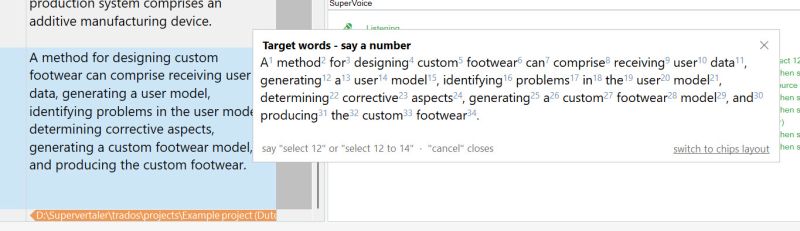
In a nutshell, Supervertaler for Trados already had a pretty comprehensive voice-command system that let you control all sorts of things in Trados Studio by voice. I have now created something similar to the old Select-and-Say in Dragon NaturallySpeaking, which those of you who used Dragon will probably know about. It refers to the ability to select words by voice. For technical reasons I won't go into now, it's difficult to select any word you want by voice, especially when multiple languages are involved. I therefore designed a system where the user can select ANY word they want in the source or target box in Trados Studio by simply saying "source numbers" or "numbers". This calls up a dialogue that shows the text in the source or target box, numbered. Saying a particular number selects a particular word. It's actually a very simple solution to a complex problem.
Edit Translations Faster With Affordable AI You Can Trust
Draftsmith is an affordable AI editing tool for busy translators. It works directly in Microsoft Word, supporting the way you work
ProZ members receive a 20% discount on a single user subscription of Draftsmith.
Check translations faster for consistency, quality and style guide compliance
PerfectIt helps professional translators deliver error-free documents in Microsoft Word and PowerPoint. It helps improve consistency, ensure quality, and enforce style guides. ProZ members receive a 30% discount off individual purchases of PerfectIt.